

In use cases like DeFi, contracts often need to mint, burn, or transfer 0 units of a token due to integer rounding. The implementation of HIP-564 in release 0.31 of Hedera Services enables smart contract developers to specify a zero value for contract functions performing token operations.
The benefit is that transactions with 0 tokens go through successfully without having to implement if statements or qualification logic to check for 0 values. This also facilitates migrating existing applications to Hedera even more as the behavior when passing 0 tokens to contract functions is the same as that of other chains. Previously, passing 0 units of a token to a contract function was not possible. Those transactions would fail while reporting an invalid token amount.
In this article, you will learn how to pass zero token values to smart contract operations on Hedera.
Try It Yourself
- Get a Hedera testnet account
- This portal acts like a faucet, giving you 10,000 test HBAR every 24 hours
- If you’re new to Hedera, check out these steps to setup your development environment
- Use this Codesandbox to try the example
- Fork the sandbox
- Remember to provide testnet account credentials in the .env file
- Open a new terminal to execute index.js
- Get the example code from GitHub
You Will Use These Tools
- Hedera JavaScript SDK (Documentation)
- Solidity and Libraries for Hedera Native Tokens (Documentation)
- Mirror node REST API (Learn More)
- Mirror node explorer (HashScan)
Example: Transfer, Mint, and Wipe a Total of 0 Tokens
This example guides you through the following steps:
- Creating an additional Hedera account (Alice), a contract, and a fungible HTS token
- Executing a contract function to transfer 0 tokens from the contract to Alice
- Executing a contract function to mint (or burn) 0 tokens
- Executing a contract function to wipe 0 tokens
After completing all steps, your console should look something like this:
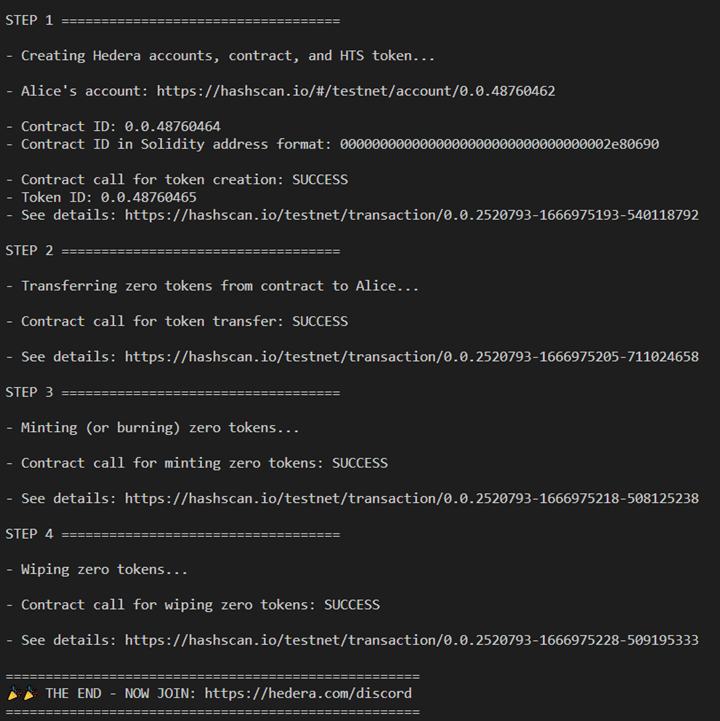
1. Create Accounts, Contract, and Fungible Token
There are four entities in this scenario: Operator, Alice, a contract, and a fungible HTS token. Your testnet credentials from the Hedera portal should be used for the operator variables, which are used to initialize the Hedera client that submits transactions to the network and gets confirmations.
- Create a new account for Alice. Start by specifying the initial balance of the new account (initBalance) to be 10 HBAR
- Generate and record the private key for the account. Hedera supports ED25519
and ECDSA
keys - Use the helper function accountCreateFcn
to create the new account- The function returns the status of the transaction (aliceSt) and the new account ID (aliceId)
- The inputs are the newly generated private key (aliceKey), initBalance, and the client object
- Output to the console a link to the mirror node explorer, HashScan, showing information about the new accounts
- Generate and record the private key for the account. Hedera supports ED25519
- Deploy the contract ZeroTokenOperations
– see the Solidity code in the second tab.- Set the gas limit (gasLim) to be 4,000,000 and define the contract bytecode
- Use ContractFunctionParameters()
from the SDK to specify the parameters for the contract constructor. Pass the Operator’s and Alice’s account IDs in Solidity format - Deploy the contract using the helper function contracts.deployContractFcn.
- The function returns the contractId
in Hedera format and contractAddress in Solidity format - The inputs are the bytecode, constructorParams, gasLim, and client
- The function returns the contractId
- Output to the console contractId and contractAddress
- Create a fungible HTS token using the function contracts.executeContractPayableFcn
- The function outputs the record for the token creation operation (tokenCreateRec)
- The inputs are the contractId, the name of the contract function to execute (createHtsToken), gasLim, and client
- Query a mirror node using the function queries.mirrorTxQueryFcn to get information from the network about the token creation transaction and a URL to check the transaction in HashScan
- The query takes in the ID of the transaction, tokenCreateRec.transactionId
- Output to the console the token ID and the HashScan URL for the transaction
Helper Functions
Using accountCreateFcn simplifies the account creation process and is reusable in case you need to create more accounts in the future. This function uses the AccountCreateTransaction()
class of the SDK. We’ll use this modular approach throughout the article.
Keep in mind that on Hedera an account and a token must be associated with each other before that account can transact the token. Notice that during creation, the account is set to have 10 automatic token associations. This way, no manual association is needed for the first 10 tokens the account wishes to transact. Visit this documentation page to learn more about token associations.
The function contracts.deployContractFcn uses ContractCreateFlow()
to store the bytecode and deploy the contract on Hedera. This single call handles for you the operations FileCreateTransaction(), FileAppendTransaction(), and ContractCreateTransaction().
The function contracts.executeContractPayableFcn
uses ContractExecuteTransaction()
in the SDK to call the specified contract function. Note that specifying .setPayableAmount()
to 20 HBAR provides sufficient funds to the contract to complete some operations like creating a fungible HTS token.
Lastly, the helper function queries.mirrorTxQueryFcn gets transaction information for the mirror nodes. The function introduces a delay of 10 seconds to allow for the propagation of information to the mirror nodes. It then formats the transaction ID and performs string operations to return a mirror REST API query and a mirror node explorer URL.
Console Output:
STEP 1 ===================================
– Creating Hedera accounts, contract, and HTS token…
– Alice’s account: https://hashscan.io/#/testnet/account/0.0.48760462
– Contract ID: 0.0.48760464
– Contract ID in Solidity address format: 0000000000000000000000000000000002e80690
– Contract call for token creation: SUCCESS
– Token ID: 0.0.48760465
– See details: https://hashscan.io/testnet/transaction/0.0.2520793-1666975193-540118792
2. Execute a Contract Function to Transfer 0 Tokens
From the Solidity code in the previous step, the fungible token created has an initial supply of 100 units and the contract is the treasury for the token.
- Use the helper function contracts.executeContractFcn
to execute the contract function transferHtsToken- In the Solidity code, the contract function transferHtsToken
transfers 0 units of the token from the contract to Alice and the transaction still goes through successfully as expected - The helper function returns the record object of the transaction (transferFtRec), which is used to obtain the status and ID of the transaction
- The inputs are the contract ID (contractId), the contract function to execute, gasLim, and client
- In the Solidity code, the contract function transferHtsToken
- Output to the console:
- The status of the contract call
- The mirror node explorer URL with more details about the transaction (after using the helper function queries.mirrorTxQueryFcn)

// STEP 2 ===================================
console.log(`nSTEP 2 ===================================n`);
console.log(`- Transferring zero tokens from contract to Alice...n`);

const transferFtRec = await contracts.executeContractFcn(contractId, "transferHtsToken", gasLim, client);
console.log(`- Contract call for token transfer: ${transferFtRec.receipt.status} n`);

const [transferFtInfo, transferExpUrl] = await queries.mirrorTxQueryFcn(transferFtRec.transactionId);
console.log(`- See details: ${transferExpUrl}`);
Helper Functions
The function contracts.executeContractFcn also uses ContractExecuteTransaction() in the SDK to call the specified contract function. However, this helper function does not set a payable amount of HBAR.
export async function executeContractFcn(cId, fcnName, gasLim, client) {
    const contractExecuteTx = new ContractExecuteTransaction().setContractId(cId).setGas(gasLim).setFunction(fcnName);
    const contractExecuteSubmit = await contractExecuteTx.execute(client);
    const contractExecuteRec = await contractExecuteSubmit.getRecord(client);
    return contractExecuteRec;
}
Console Output:
STEP 2 ===================================
– Transferring zero tokens from contract to Alice…
– Contract call for token transfer: SUCCESS
– See details: https://hashscan.io/testnet/transaction/0.0.2520793-1666975205-711024658
3. Execute a Contract Function to Mint or Burn 0 Tokens
In this step:
- Use the helper function contracts.executeContractFcn
again to execute the contract function mintHtsToken (or burnHtsToken)- As seen in the Solidity code in the first step, this contract function adds (or removes) 0 units to the existing token supply and the transaction completes successfully as expected
- The helper function returns the record object of the transaction (mintFtRec or burnFtRec)
- Output to the console:
- The status of the contract call
- The mirror node explorer URL with more details about the transaction (after using the helper function queries.mirrorTxQueryFcn)
// STEP 3 ===================================
console.log(`nSTEP 3 ===================================n`);
console.log(`- Minting (or burning) zero tokens...n`);

const mintFtRec = await contracts.executeContractFcn(contractId, "mintHtsToken", gasLim, client);
console.log(`- Contract call for minting zero tokens: ${mintFtRec.receipt.status} n`);

const [mintFtInfo, mintExpUrl] = await queries.mirrorTxQueryFcn(mintFtRec.transactionId);
console.log(`- See details: ${mintExpUrl}`);

// const burnFtRec = await contracts.executeContractFcn(contractId, "burnHtsToken", gasLim, client);
// console.log(`n - Contract call for burning zero tokens: ${burnFtRec.receipt.status} n`);
// const [burnFtInfo, burnExpUrl] = await queries.mirrorTxQueryFcn(burnFtRec.transactionId);
// console.log(`- See details: ${burnExpUrl}`);
Console Output:
STEP 3 ===================================
– Minting (or burning) zero tokens…
– Contract call for minting zero tokens: SUCCESS
– See details: https://hashscan.io/testnet/transaction/0.0.2520793-1666975218-508125238
4. Execute a Contract Function to Wipe 0 Tokens
Finally, in this step:
- Use the helper function contracts.executeContractFcn
one more time to execute the contract function wipeHtsToken- As shown in the Solidity code, this contract function wipes 0 units of the fungible token from Alice’s account and the transaction completes successfully as expected
- The helper function returns the record object of the transaction (wipeFtRec)
- Output to the console:
- The status of the contract call
- The mirror node explorer URL with more details about the transaction (after using the helper function queries.mirrorTxQueryFcn)
The last step is to join the Hedera Developer Discord!
// STEP 4 ===================================
console.log(`nSTEP 4 ===================================n`);
console.log(`- Wiping zero tokens...n`);

const wipeFtRec = await contracts.executeContractFcn(contractId, "wipeHtsToken", gasLim, client);
console.log(`- Contract call for wiping zero tokens: ${wipeFtRec.receipt.status} n`);

const [wipeFtInfo, wipeExpUrl] = await queries.mirrorTxQueryFcn(wipeFtRec.transactionId);
console.log(`- See details: ${wipeExpUrl}`);

console.log(`
====================================================
THE END - NOW JOIN: https://hedera.com/discord
====================================================n`);
Console Output:
STEP 4 ===================================
– Wiping zero tokens…
– Contract call for wiping zero tokens: SUCCESS
– See details: https://hashscan.io/testnet/transaction/0.0.2520793-1666975228-509195333
====================================================
THE END – NOW JOIN: https://hedera.com/discord
====================================================
Summary
Now you know how to perform contract actions with zero token units on Hedera using the JavaScript SDK and Solidity. You can try this example with the other officially supported SDKs for Java, Go, and Swift.
Keep in mind that zero token operations can also be performed with the SDK. For instance, a token transfer as follows completes successfully:
//Transfer token
const tokenTransferTx = new TransferTransaction()
    .addTokenTransfer(tokenId, operatorId, 0) // deduct 0 tokens
    .addTokenTransfer(tokenId, aliceId, 0) // increase balance by 0
    .freezeWith(client);
const tokenTransferSign = await tokenTransferTx.sign(operatorKey);
const tokenTransferSubmit = await tokenTransferSign.execute(client);
//Verify the transaction reached consensus
const tokenTransferRec = await tokenTransferSubmit.getRecord(client);